บทที่ 1/13 · 17 คำ · จำได้แล้ว 0
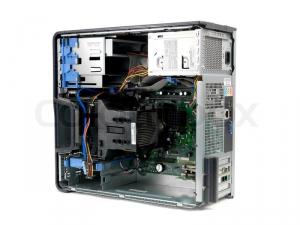
Computer hardware
ฮาร์ดแวร์คอมพิวเตอร์
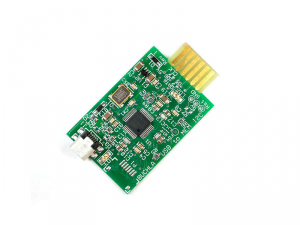
เฟิร์มแวร์
software stored permanently on a hardware device that controls how the device works
Please update the firmware on all routers to fix the security issue.
กรุณาอัปเดตเฟิร์มแวร์ของเราเตอร์ทุกเครื่องเพื่อแก้ไขปัญหาด้านความปลอดภัย
The printer stopped working properly after a failed firmware update.
คำพ้องความหมายembedded softwaresystem softwareคำตรงข้ามhardwareapplication softwareฮาร์ดแวร์, อุปกรณ์คอมพิวเตอร์
the physical parts of a computer system, such as the processor, memory, screen and cables
Our IT team replaced the old hardware in the accounting department last month.
ทีมไอทีของเราเปลี่ยนฮาร์ดแวร์เก่าในแผนกบัญชีเมื่อเดือนที่แล้ว
The software runs slowly because the hardware is more than eight years old.
คำพ้องความหมายequipmentmachinerycomponentscircuitryinfrastructureคำตรงข้ามsoftwareprogramsapplicationsหน่วยประมวลผลกลาง, ซีพียู
central processing unit: the main chip in a computer that carries out instructions and controls other parts
The server slowed down because CPU usage reached almost 100 percent.
เซิร์ฟเวอร์ทำงานช้าลงเพราะการใช้งาน CPU สูงเกือบ 100 เปอร์เซ็นต์
For video editing, you need a powerful CPU and plenty of memory.
คำพ้องความหมายprocessormicroprocessorcentral processing unitคำตรงข้ามperipheralauxiliary componentไดรเวอร์อุปกรณ์, ตัวขับอุปกรณ์
a small program that lets the operating system communicate with a piece of hardware
The webcam did not work until we installed the correct device driver.
เว็บแคมใช้งานไม่ได้จนกว่าเราจะติดตั้งไดรเวอร์อุปกรณ์ที่ถูกต้อง
Outdated device drivers can cause crashes and poor performance.
คำพ้องความหมายdriversoftware driverคำตรงข้ามNoneไบออส, ระบบพื้นฐานนำเข้า-ส่งออก
basic input/output system: built-in software that starts a computer and checks the hardware before the operating system loads
Press F2 during start-up to enter the BIOS settings.
กด F2 ระหว่างเปิดเครื่องเพื่อเข้าสู่การตั้งค่า BIOS
The technician changed the boot order in the BIOS to install Windows from USB.
คำพ้องความหมายBasic Input/Output Systemคำตรงข้ามNoneการ์ดจอ, การ์ดแสดงผล
a component that processes images and video and sends them to the screen
Designers in our team need laptops with a dedicated graphics card.
นักออกแบบในทีมของเราต้องใช้แล็ปท็อปที่มีการ์ดจอแยก
The AI lab bought servers with powerful graphics cards to train models.
คำพ้องความหมายvideo carddisplay adapterGPUคำตรงข้ามintegrated graphicsเมนบอร์ด, แผงวงจรหลัก
the main circuit board in a computer, which connects the CPU, memory and other components
The technician said the motherboard was damaged and had to be replaced.
ช่างเทคนิคบอกว่าเมนบอร์ดเสียหายและต้องเปลี่ยนใหม่
Check that the new RAM is compatible with your motherboard before you buy it.
คำพ้องความหมายmainboardsystem boardคำตรงข้ามdaughterboardexpansion cardUSB, ยูเอสบี
universal serial bus: a standard way of connecting devices such as keyboards and flash drives to a computer
For security reasons, staff cannot use personal USB drives on office computers.
เพื่อความปลอดภัย พนักงานไม่สามารถใช้แฟลชไดรฟ์ USB ส่วนตัวกับคอมพิวเตอร์ของสำนักงานได้
Connect the scanner to your laptop with the USB cable.
คำพ้องความหมายflash drivememory stickthumb driveคำตรงข้ามN/Aฮาร์ดดิสก์, ฮาร์ดไดรฟ์
a device inside or connected to a computer that stores data permanently on spinning disks
All customer files were saved on an external hard drive as a backup.
ไฟล์ลูกค้าทั้งหมดถูกบันทึกไว้ในฮาร์ดดิสก์ภายนอกเพื่อสำรองข้อมูล
The laptop would not start because the hard drive had failed.
คำพ้องความหมายHDDstorage driveinternal memoryคำตรงข้ามcloud storageexternal driveflash driveคอร์, แกนประมวลผล
one of several processing units inside a CPU that can each run tasks at the same time
This laptop has an eight-core processor, so it handles heavy tasks easily.
แล็ปท็อปเครื่องนี้มีโปรเซสเซอร์แปดคอร์ จึงจัดการงานหนักได้อย่างง่ายดาย
The database server uses all its cores during the nightly reports.
RAM, หน่วยความจำหลัก
random access memory: the short-term memory a computer uses to hold data while programs are running
We added more RAM to the developers' machines so they can run several virtual servers.
เราเพิ่ม RAM ให้เครื่องของนักพัฒนา เพื่อให้รันเซิร์ฟเวอร์เสมือนหลายตัวได้
If you open too many browser tabs, the computer may run out of RAM.
SSD, ไดรฟ์โซลิดสเตต
solid-state drive: a fast storage device with no moving parts that keeps data on memory chips
Switching to an SSD made the old laptops start in under twenty seconds.
การเปลี่ยนมาใช้ SSD ทำให้แล็ปท็อปเครื่องเก่าเปิดเครื่องได้ในเวลาไม่ถึงยี่สิบวินาที
Our cloud servers use SSD storage for better database performance.
แคช, หน่วยความจำแคช
a small area of fast memory that stores recently used data so it can be accessed again quickly
If the page looks wrong, try clearing your browser cache.
ถ้าหน้าเว็บแสดงผลผิดปกติ ให้ลองล้างแคชของเบราว์เซอร์
The CPU cache helps the processor reach frequently used data faster.
พื้นที่จัดเก็บข้อมูล, หน่วยจัดเก็บข้อมูล
the space on a computer or online service where data and files are kept
Each employee has 100 GB of storage on the company drive.
พนักงานแต่ละคนมีพื้นที่จัดเก็บข้อมูล 100 GB บนไดรฟ์ของบริษัท
The server is running out of storage, so we need to delete old logs.
อุปกรณ์ต่อพ่วง, อุปกรณ์ภายนอก
an extra device connected to a computer, such as a printer, scanner, keyboard or webcam
The help desk keeps spare peripherals like mice and headsets for new staff.
ฝ่ายช่วยเหลือด้านไอทีเก็บอุปกรณ์ต่อพ่วงสำรอง เช่น เมาส์และชุดหูฟัง ไว้สำหรับพนักงานใหม่
Some older peripherals do not work with the new operating system.
พอร์ต, ช่องเชื่อมต่อ
a socket on a computer where you plug in a cable or device
The new laptop has only two USB ports, so you may need an adapter.
แล็ปท็อปเครื่องใหม่มีพอร์ต USB เพียงสองพอร์ต คุณจึงอาจต้องใช้อะแดปเตอร์
Plug the network cable into the Ethernet port on the back of the PC.
ชุดจ่ายไฟ, พาวเวอร์ซัพพลาย
the part of a computer that changes mains electricity into the power the components need
The server shut down suddenly because of a faulty power supply.
เซิร์ฟเวอร์ดับกะทันหันเนื่องจากชุดจ่ายไฟชำรุด
Make sure the power supply is strong enough for the new graphics card.